
Musician Website Design Process for Effective Online Presence
Balancing music and technology can feel overwhelming for Indie musicians with zero design experience. You want your songs on Spotify to reach more fans, yet building a website that actually works is confusing. Focusing on efficient website solutions lets you highlight your Spotify links and build a solid online presence without getting lost in technical details. This guide shows how the right features and layout can help you share your music, promote your shows, and connect with listeners worldwide.
Quick Summary
Key Takeaway | Explanation |
|---|---|
1. Define your website goals | Identify what you want to achieve with your site, such as promoting music or connecting with fans. |
2. Choose the right platform | Select a website builder that fits your needs, focusing on ease of use and built-in features. |
3. Optimize layout for engagement | Place key content like Spotify links prominently to capture visitors’ attention immediately. |
4. Ensure seamless functionality | Test all elements on multiple devices to confirm a smooth user experience for visitors. |
5. Keep content updated regularly | Refresh your site with new music, tours, and bios to maintain engagement and show activity. |
Step 1: Identify Essential Website Goals and Features
Before you build anything, you need to know what you’re actually trying to accomplish. Your website isn’t just a digital business card, it’s your central hub for connecting with fans, booking gigs, and selling your music. Take time to think about what matters most to you and your audience.
Start by asking yourself these questions:
What’s your main goal? Are you promoting new releases, building an email list, driving streams on Spotify, or booking performances?
Who are you trying to reach? Local fans, venue owners, record labels, or a global audience?
What action do you want visitors to take? Listen to music, buy merchandise, sign up for newsletters, or contact you for bookings?
Once you’ve identified your primary goals, think about the essential features that support them. Every feature you add should serve a purpose and make the experience better for your visitors.
Your website goals shape every design decision you make—without clarity on these, you’ll end up with a site that looks nice but doesn’t actually help your music career.
Most musicians need these core features to start:
Music player so visitors can listen to your tracks directly
Spotify integration to showcase your streaming presence
Contact or booking information so promoters and fans can reach you
Bio section to tell your story and build connection
Upcoming shows or event calendar if you perform live
Links to your socials to drive traffic across platforms
Email signup to build your mailing list for announcements
Don’t overcomplicate this. When you’re starting out, focus on what actually matters for your music. You can always add features later. The key is getting something live that serves your primary goal. If you want to build band web pages with your Spotify profile, start with music and direct ways for people to connect with you.
Think about your workflow too. Will you be updating your site frequently? Do you need a simple solution or something more customizable? These practical questions matter because they affect which solution works best for you.
Pro tip: Write down your top three website goals right now. Rank them by importance and keep that list visible while you design—it’ll keep you focused and prevent feature creep from derailing your project.
Step 2: Select the Right Platform and Gather Key Assets
Now that you know what you want to accomplish, it’s time to pick the right platform and collect everything you’ll need to build your site. The platform you choose will affect how quickly you launch and how much control you have over your music’s presentation.
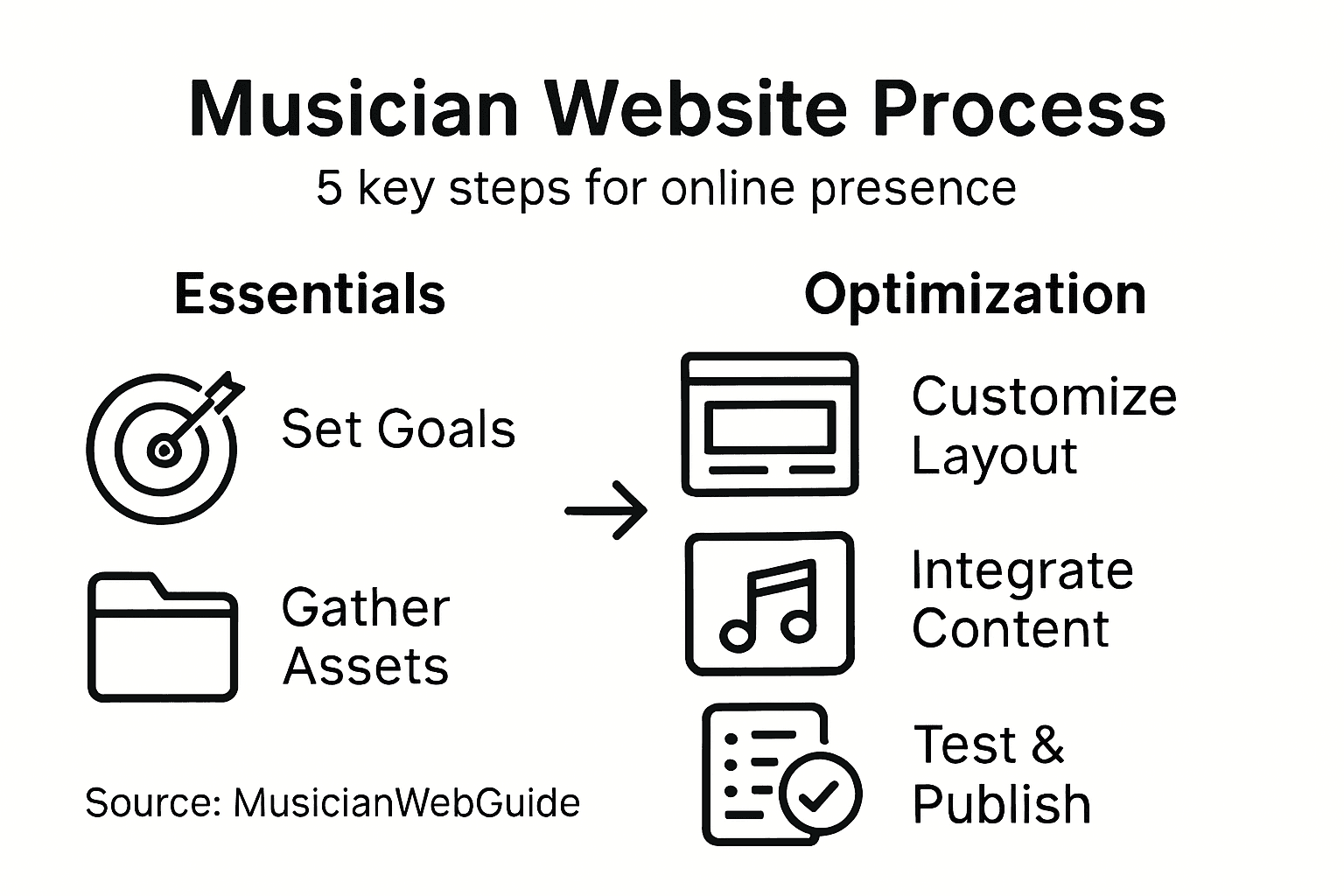
There are several solid options for musicians. Website builders for musicians should include built-in audio players, event calendars, email signup forms, and the ability to integrate streaming services like Spotify. Some platforms excel at ease of use, while others offer more growth potential and customization.
Here’s a quick comparison of popular website platforms for musicians:
Platform Type | Customization Level | Ease of Use | Growth Potential |
|---|---|---|---|
Drag-and-drop Builder | Limited by templates | Very user-friendly | Suitable for beginners |
WordPress-based | Highly flexible | Moderate learning | Scalable for large sites |
Music-specific Builder | Tailored features | Easiest setup | Focused on musicians |
Consider these when evaluating platforms:
Ease of use: Do you want drag-and-drop simplicity or are you comfortable with more complex tools?
Built-in features: Does the platform support music players, tour dates, merchandise sales, and Spotify integration out of the box?
Cost: Are you looking for a free option or willing to invest in a paid solution?
Scalability: Will the platform grow with you as your music career expands?
Ownership: Do you own your content and data, or does the platform lock you in?
The right platform removes friction from your creative process—you want to spend time on your music, not fighting with technology.
While you’re deciding on a platform, start gathering your key assets. These are the pieces you’ll need ready before you actually build anything. Most musicians need these items prepared:
High-quality photos of yourself or your band
Your bio (short version for homepage, longer version for dedicated page)
Links to all your music streaming profiles
A logo or branding colors you want to use
Your best audio tracks or clips ready to embed
Contact information or booking email
Social media handles and links
Any upcoming show dates or events
Merchandise information if you’re selling anything
Having these assets prepared saves you time during the actual building process. You won’t get stuck mid-design searching for a photo or rewriting your bio. Plus, many platforms with musician-focused features make it simple to pull in your Spotify links and streaming data automatically, so keep your streaming profile URL handy.
Don’t stress if you don’t have everything perfect. Your assets can evolve as you do. Just get the basics organized so you can move forward without unnecessary delays.
Pro tip: Create a simple folder on your computer with all your assets labeled and organized—photos in one subfolder, audio files in another, links in a document. When you start building, you’ll have everything within arm’s reach and avoid the frustration of hunting for files.
Step 3: Customize Layouts to Highlight Your Spotify Links
Your layout is where design meets strategy. This is where you decide what gets seen first and what draws visitors deeper into your music. Think of your homepage as a funnel that guides listeners straight to your Spotify presence.
Start by placing your Spotify player or links above the fold, meaning in the section visible without scrolling. This is real estate you’ve earned, and you want it working for you. When someone lands on your site, they should see your music within seconds, not buried underneath a wall of text.
Here’s how to structure your layout effectively:
Put your best music front and center using embedded players or streaming links
Feature your Spotify artist profile link prominently so fans can follow you there
Add a “Listen Now” button or section that’s impossible to miss
Include your latest release or most popular tracks as the default player
Position tour dates and contact info nearby so fans can take action
Use consistent branding and colors that match your music’s vibe
Consider how musician websites embed music players alongside streaming service links. When done right, fans can listen on your site or jump to Spotify with one click. This flexibility matters because different listeners prefer different platforms.
Your layout should make fans feel your music is the main event, not an afterthought tucked away in a corner.
Think about visual hierarchy. What’s the most important thing you want visitors to do? If it’s driving Spotify streams, make that the visual focal point. Use larger fonts, better spacing, eye-catching buttons, or contrasting colors to draw attention.
Don’t cram everything in. White space is your friend. Visitors should be able to scan your page and understand your music’s story without feeling overwhelmed. A clean layout says you’re professional, while a cluttered one says you’re inexperienced.
Test how your layout looks on mobile phones too. Most people discover new music on their phones, so if your Spotify links look small or hard to tap on mobile, you’re losing potential fans right there.
Pro tip: Create a simple sketch or wireframe on paper before you start customizing your platform’s template. Draw boxes for your hero image, music player, Spotify link, and other elements to visualize the flow before you build it.
Step 4: Integrate Content and Optimize User Experience
Now comes the part where everything you’ve prepared comes together. Integration is about weaving your music, bio, links, and calls to action into a seamless experience that keeps visitors engaged. User experience is about making sure everything works smoothly and feels natural.

Start with your audio players. They should load quickly and be easy to use. Slow players frustrate visitors and waste your chance to make an impression. Test them on different devices and internet speeds. If your player takes ten seconds to load, people are already leaving.
Organize your content with clear navigation that makes sense. Visitors shouldn’t have to hunt for things. Your music should be one click away, your bio should be easy to find, and your Spotify link should be visible without scrolling too much.
Building music-based websites requires intuitive navigation alongside fast-loading players and consistent visual branding. These elements work together to keep visitors exploring instead of bouncing away.
Here are the core pieces to integrate:
Music players that load fast and sound good
Tour dates and event information updated regularly
Bio content that tells your story in an engaging way
Merchandise or music links if you’re selling anything
Email signup forms positioned naturally throughout
Social media links so fans can follow you everywhere
Contact information for booking and business inquiries
Good user experience means visitors can find what they came for within seconds, not buried under design fluff.
Think about mobile optimization seriously. More than half of web traffic comes from phones now. Your site needs to look great and function perfectly on small screens. Buttons should be finger-sized, text should be readable without zooming, and images should load quickly.
Test your site regularly. Click through every link. Play every player. Fill out every form. Try it on different phones and browsers. The more you test, the more problems you catch before fans experience them.
Content integration also means keeping things updated. Old tour dates and outdated bios make you look inactive. Set aside time each month to refresh your site with new music, upcoming shows, or recent accomplishments.
Use this summary to check if your musician site is well-integrated and optimized:
Integration Area | What to Check | Impact on Visitors |
|---|---|---|
Audio Player | Loads quickly and easy to use | Reduces frustration, boosts play |
Navigation | Clear and intuitive structure | Helps visitors find content fast |
Mobile Experience | Responsive and finger-friendly | Retains mobile users |
Content Updates | Fresh tour dates and bio | Shows professionalism |
Pro tip: Use Google’s free mobile testing tool to check how your site performs on phones and tablets, then fix any issues before your site goes live.
Step 5: Test Functionality and Publish Your Musician Website
You’re almost there. Before you flip the switch and go live, you need to thoroughly test everything. A broken link or slow player on launch day sends the wrong message to potential fans. Testing is your safety net.
Start by testing across different devices. That means phones, tablets, and computers. Check it on iPhone and Android. Try it in Chrome, Firefox, Safari, and Edge. What looks perfect on your laptop might be a mess on someone’s phone. You want to catch these issues now, not hear about them from fans.
Test every interactive element on your site. Click every link. Play every music player. Fill out every form. Try to buy something if you have merchandise. Load times matter too. Fast loading speeds and responsive design ensure musician websites perform well across devices, so check your page speed on a free tool like Google PageSpeed Insights.
Here’s your testing checklist:
Test all links go where they should
Verify music players load and play correctly
Check that Spotify links open properly
Confirm email signup forms actually capture addresses
Test contact forms send you the message
Verify mobile layout looks good and functions smoothly
Check that images load fast
Test on multiple browsers and devices
Don’t launch until you’ve tested like a fan would. Click, play, scroll, and submit just like a visitor would experience your site.
Once you’ve tested thoroughly, publish your site. This is the exciting part. Your music is now live on the internet for the world to find. Take a moment to celebrate, then immediately start promoting.
After launch, things don’t stop. Website maintenance keeps your site secure and running smoothly, so plan to check your site regularly. Update tour dates, add new music, refresh your bio. A living site signals you’re active. A stagnant site with old information makes visitors wonder if you’re still making music.
Monitor your analytics too. See where visitors come from. Which pages do they spend time on? Do they click your Spotify link? Use these insights to improve your site over time.
Pro tip: Ask two or three musician friends to test your site before you publish it. They’ll catch things you missed and give you honest feedback about the user experience.
Build a Musician Website That Truly Works for You
Creating an effective online presence as a musician means overcoming challenges like unclear goals, complicated platforms, and disorganized content. This article highlights common pain points such as zeroing in on your primary website goals, integrating your Spotify links seamlessly, and delivering a smooth user experience that turns visitors into fans. If you have ever felt overwhelmed by technology or struggled to showcase your music the right way, you are not alone.
Take control with an instant website builder designed specifically for bands and musicians using your Spotify links. Our solutions prioritize clarity, simplicity, and speed so you can focus on your music while your website connects with fans exactly as intended. From easy integration of streaming profiles to mobile-optimized layouts that highlight your latest tracks, the process is straightforward and flexible to grow with your career.

Ready to skip the guesswork and start building a site that highlights your voice and music professionally? Discover how The Digital Fair lets you launch your musician website instantly with features tailored to your needs. Explore how you can build a powerful online presence and keep your site updated effortlessly. Don’t wait for the perfect time – get started now and captivate your audience with a site that works as hard as you do.
Frequently Asked Questions
What are the essential website goals for musicians?
Every musician should identify clear goals like promoting new releases, building an email list, driving streams on Spotify, or booking performances. Start by writing down your top three goals and keep them visible during the design process to maintain focus.
How can I choose the right platform for my musician website?
Select a platform that fits your needs regarding ease of use, built-in features, and growth potential. Compare options like drag-and-drop builders for simplicity or WordPress for flexibility and scalability, then choose one that aligns with your website goals.
What key assets do I need before building my musician website?
Prepare high-quality photos, your bio, links to music streaming profiles, a logo, and any upcoming show dates. Organize these assets in a dedicated folder to streamline the building process and avoid delays.
How do I create an effective layout for my musician website?
Prioritize important elements by placing your best music and Spotify links above the fold so visitors can access them easily. Sketch a wireframe layout on paper before implementing it to visualize where to place each component clearly.
How do I ensure a smooth user experience on my musician website?
Integrate fast-loading audio players and clear navigation to make it easy for visitors to find what they’re looking for. Test your site on multiple devices to ensure that everything functions correctly and maintains a clean, welcoming design.
What steps should I take before publishing my musician website?
Thoroughly test all interactive elements, links, and audio players across different devices and browsers. After ensuring everything works correctly, publish your site and plan to regularly update content to keep it fresh and engaging.